
Home Screen Title Widget Pro - Google Play
You'll be able to see results in few seconds.
Publisher Description

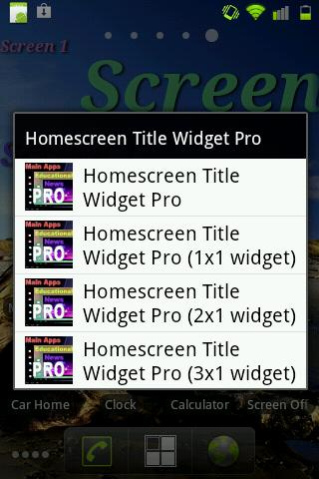
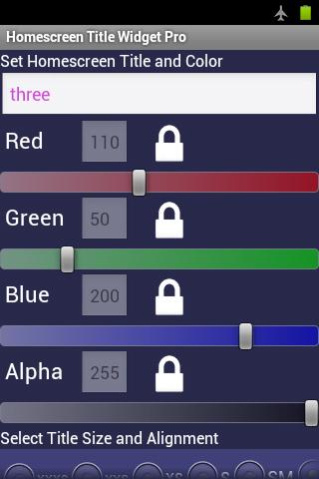
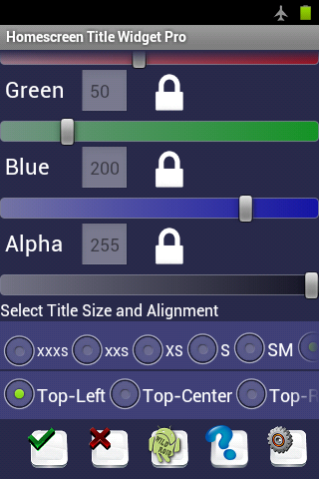
This is the professional version of Home Screen Title Widget. This widget allows you to add a Title to the home screen. It works with most launchers and produces good looking labels. You can create multiple title widgets with different text, even on different home screens. Title color can be set using Red, Green, Blue and Alpha controls. Color settings can be locked and unlocked using white lock/unlock buttons to prevent unintended changes. Title text font can be set at a suitable style and size using several preset sizes: Extra Small to Extra Large. Title text alignment can be set for each title widget. Title text alignment works best with smaller text sizes. This Title Widget works on most Android Tablets and Phones.
ATTENTION: If the app does not work on your device as should once you install it due to third party modifications, you can uninstall app within Google Play 15 min trial period to avoid being charged.
When adding the widget to the HOME screen, you will see four widgets in the widgets list (standard 4x1, 1x1, 2x1, and 3x1 resizable widgets) to accommodate launchers that do not allow widget resizing. (HINT: Start with standard widget and resize as necessary.)
Once the Title Widget is placed on the home screen, you can drag and place the widget anywhere on the home screen. You can add as many titles as you wish; for example, name your home screens: Main Apps, Games, Tools, Office Apps, etc.
To edit the text, simply tap the widget. NOTE: Widget Edit Mode can be disabled under Settings. To re-size the widget view and make sure the entire title is shown, apply a long press on the widget which will bring up sizing controls outline. (see photos)
NOTE:
1. If the app widget does not show in the Widgets list to add to home screen, move the app installation to the device and NOT the SD card. Most app widgets do not work when installed on the SD card.
2. Changes to preferences under Settings screen are Global. This includes Animated Title, Shadowed Title, Text Font Style and Widget Edit Mode. Changes to these settings are automatically applied to all Homescreen Title Widgets.
3. If Widget Edit Mode is disabled, all Title Widgets cannot be edited by tapping. To enable Widget Edit Mode, run the app again by adding a new Title Widget which opens the app and then change settings.
Finally: We encourage our users to contact us via email to discuss any concerns or suggestions regarding the app, if any. We cannot address review comments due to the fact that most negative comments that are left without prior contact with the developer are placed with the intent to lower app ratings and misguide the consumer.
The Free App is limited to one size widget, white color text, one text size and no disable edit mode.
Copyright 2012 wildroid.com
About Home Screen Title Widget Pro
The company that develops Home Screen Title Widget Pro is wildroid. The latest version released by its developer is 1.0 .
To install Home Screen Title Widget Pro on your Android device, just click the green Continue To App button above to start the installation process. The app is listed on our website since 2018-10-27 and was downloaded 0 times. We have already checked if the download link is safe, however for your own protection we recommend that you scan the downloaded app with your antivirus. Your antivirus may detect the Home Screen Title Widget Pro as malware as malware if the download link to com.wildroid.screen.title.widget.pro is broken.
How to install Home Screen Title Widget Pro on your Android device:
- Click on the Continue To App button on our website. This will redirect you to Google Play.
- Once the Home Screen Title Widget Pro is shown in the Google Play listing of your Android device, you can start its download and installation. Tap on the Install button located below the search bar and to the right of the app icon.
- A pop-up window with the permissions required by Home Screen Title Widget Pro will be shown. Click on Accept to continue the process.
- Home Screen Title Widget Pro will be downloaded onto your device, displaying a progress. Once the download completes, the installation will start and you'll get a notification after the installation is finished.
Program Details
System requirements
Download information
Pricing
Version History
version
posted on 2018-10-28
v.10.0.6 - Improved App performance.
v.10.0.5 - Added button to change Edit Text Box background color to a darker color so that white color text and other light colors text show better during edit.
v.10.0.4 & 10.0.3 - Android KitKat Support.
v.10.0.2 - Added Title alignment setting within each widget. Added color setting lock and unlock buttons to prevent unintended changes. Improved overall app performance.
version 10.0.5
posted on 2014-07-26
v.10.0.5 - Added button to change Edit Text Box background color to a darker color so that white color text and other light colors text show better during edit.,v.10.0.4 & 10.0.3 - Android KitKat Support.,v.10.0.2 - Added Title alignment setting within each widget. Added color setting lock and unlock buttons to prevent unintended changes. Improved overall app performance.,v.10.0.1 - App performance improvements.,v.10 - Added setting to enable/disable Widget Edit Mode.
version 10.0.2
posted on 2013-03-28
Several fixes and updates
Disclaimer
Official Google Play Link
We do not host Home Screen Title Widget Pro on our servers. We did not scan it for viruses, adware, spyware or other type of malware. This app is hosted by Google and passed their terms and conditions to be listed there. We recommend caution when installing it.
The Google Play link for Home Screen Title Widget Pro is provided to you by apps112.com without any warranties, representations or guarantees of any kind, so access it at your own risk.
If you have questions regarding this particular app contact the publisher directly. For questions about the functionalities of apps112.com contact us.
